


AiDot – Smart Home Life
3.8880.00 Reviews
App Specs
- Version
- 2.24.2
- Updated On
- License
- Free
- Downloads
- 500,000+
- Developer
- AiDot Inc
- Categories
- Lifestyle
- Platform
- Android
Screenshots
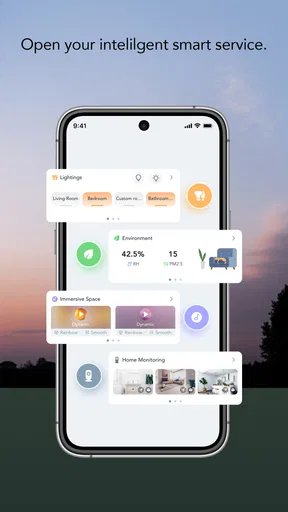
 Analysis by AppCompare
I approached AiDot – Smart Home Life as a practical lifestyle app rather than another dashboard I would open once and forget. Its purpose is to bring compatible home devices into one place, with an emphasis on making everyday spaces more colorful and secure. After spending time with it, my view is fairly clear: it is most useful for someone who already owns supported smart-home products and wants a single control point, but it is less compelling for a person looking for a broad, device-agnostic home automation system.
The app is free, aimed at Everyone, and developed by AiDot Inc. It belongs to the lifestyle category, although its real value depends less on browsing or entertainment and more on how well it fits into the routines already happening in your home. I would not install it simply because I wanted a smart-home app. I would install it because I had compatible devices and wanted to reduce the number of separate apps I use.
How AiDot fits into daily smart-home control
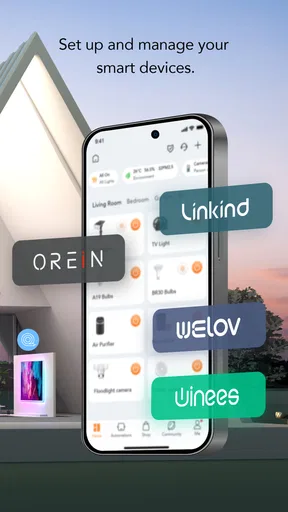
The first thing I noticed is that the app makes more sense when viewed as a central layer for connected home products. Instead of treating each bulb, security-related device, or other supported accessory as an isolated purchase with its own control screen, AiDot gives the home a shared place to manage them. That sounds simple, but the practical benefit is real: fewer app switches, fewer forgotten controls, and a more consistent way to check what is happening.
Its store summary focuses on two ideas: color and security. Those themes help explain who will notice the benefit most. If your setup includes lighting that you regularly adjust, the app can become part of the mood-setting routine in a living room, bedroom, or workspace. If your supported devices relate to home awareness or protection, having them alongside other connected products can make the overall setup easier to remember and supervise.
I would describe the experience as useful rather than magical. AiDot does not turn an ordinary home into a fully autonomous house by itself. The app is a controller and organizing layer; the quality of the experience still depends on the devices connected to it, their compatibility, and how much time you are willing to spend arranging your setup.
The strongest reason to use it is consolidation
My favorite aspect is the possibility of replacing a scattered collection of device controls with one familiar starting point. A typical smart-home owner can easily end up with one app for lighting, another for a camera or security accessory, and yet another for a different brand of connected product. That arrangement is manageable when the devices are new, but it becomes annoying when a simple evening routine requires several separate launches.
AiDot is strongest when it gives you a repeatable path through those tasks. For example, imagine arriving home after work and wanting to change the lighting before settling in. Rather than searching through several brand apps, you can begin with the same home-control environment each time. That small reduction in friction is more valuable than flashy presentation because it affects a routine you may repeat every day.
Worth Reading Before You Choose

EA SPORTS FC Mobile 26 Is a Bigger Football Game, but It Takes Time

Flipboard Shows What News Apps Must Do Beyond the Feed

Switching to Android Auto Means Rethinking Your Driving Routine

Google Calendar Makes a Crowded Week Easier to Manage

Ludo King Makes the Most of the Minutes Between Plans

Baby Panda World Brings Quick Play to Modern Phones, but Its Game Library Feels Busy
There is also a useful psychological advantage to centralization. When controls are spread across unrelated apps, I am more likely to ignore a device after the novelty wears off. A shared home interface makes the connected equipment feel like one setup instead of a pile of experiments. That can encourage more consistent use, especially for people who want their lighting or security-related devices to support habits rather than remain occasional gadgets.
Another practical point is that the app can be a better starting place for household members who did not install every device themselves. A single control environment is easier to explain than a collection of brand-specific applications. I would still expect some setup work, but once the arrangement is familiar, the learning burden is lower than asking everyone to remember which app belongs to which accessory.
Color control is more useful when tied to routines
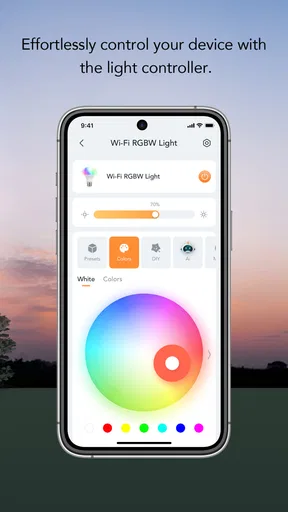
The colorful side of the app should not be treated as a decorative extra. Adjustable lighting can serve different purposes throughout the day: a brighter environment for focused work, a softer atmosphere in the evening, or a more noticeable setting when you want a room to feel different without changing furniture or décor. The important insight is to connect those changes to moments in your routine instead of constantly adjusting them for novelty.
I found that the best approach is to keep a small number of lighting habits in mind. For instance, one arrangement can be reserved for concentration, another for winding down, and a third for social occasions. Even if you only change lighting manually, thinking in these groups makes the app more useful than treating color selection as an endless menu of shades.
There is a trade-off, however. Colorful control is only meaningful if your connected lighting hardware supports the changes you want. The app cannot make a basic light produce effects that the physical product does not provide. Before building your entire home around the visual side, I would check that your existing devices are compatible and that their capabilities match your expectations.
A realistic evening workflow
Here is the kind of scenario where I think AiDot earns its place. You finish work in a room that needs bright light, then later move into a quieter evening routine. Instead of leaving the same harsh setting on until bedtime, you open the app, adjust the connected lighting for a calmer atmosphere, and check the relevant home devices from the same general space. The value is not one dramatic feature; it is the combination of small actions becoming easier to repeat.
For a household with several connected products, I would spend a little time deciding which controls matter most. Put the devices you check or adjust frequently at the center of your personal routine, and avoid turning the home screen into a catalogue of every accessory you own. A crowded control experience can defeat the purpose of consolidation.
This is one of the less obvious ways to get more from the app: treat it as a routine tool, not a showroom. The more often you use the same controls in the same circumstances, the more clearly you can tell whether it is actually saving time.
Security-related convenience needs sensible expectations
The security angle is appealing, but I would be careful about interpreting it too broadly. An app that helps you manage supported home devices can make checking your connected environment more convenient. It should not be treated as a replacement for sensible physical security, careful device placement, strong account habits, or attention to alerts and equipment condition.
For me, the useful question is not whether an app makes a home automatically secure. The better question is whether it helps me remember and manage the devices intended to support awareness or protection. If AiDot brings those controls into a place I already use, that can reduce the chance that I forget about them. If the setup becomes confusing or requires frequent troubleshooting, the convenience quickly loses its value.
I would also avoid assuming that every connected product behaves identically inside the app. Different devices can have different controls, and a central interface may simplify access without making every function equally deep. That is a normal compromise in multi-device platforms: convenience improves, while some brand-specific detail may remain elsewhere.
Where the experience can become frustrating
The main weakness is the same feature that makes AiDot attractive: consolidation depends on compatibility. If your home is built around products that do not work with the app, its usefulness drops sharply. In that situation, a broad platform with wider support may be a better choice, even if its interface feels less focused.
This is why I would not begin by asking whether the app looks appealing. I would begin by checking whether the devices I already own belong in its ecosystem. Starting with the app and buying hardware later can lead to an unnecessarily narrow setup. Starting with a quick inventory of your lights and connected home products gives you a much clearer idea of whether AiDot can become your main control point.
There is also a learning curve whenever several devices are brought together. The first session may involve identifying products, organizing them by room or purpose, and deciding which controls deserve attention. That work is not a flaw unique to AiDot, but it is still part of the real cost. A person who wants instant simplicity may find the setup more involved than expected.
Another limitation is that a unified app can create the impression that every product will feel equally integrated. In practice, the depth of control can vary from one device type to another. You may appreciate the convenience of reaching everything from one place while still needing a manufacturer-specific app for a more detailed adjustment. I see that as a reasonable trade-off, but it means AiDot may reduce app switching rather than eliminate it completely.
The rating of 3.8 from around two and a half thousand ratings suggests a mixed but substantial user response. I would read that as a reason to set realistic expectations, not as a verdict by itself. Smart-home apps are especially sensitive to differences in hardware, network conditions, room layouts, and personal expectations. A setup that feels smooth for one household can feel awkward for another.
The release history also matters less than the current experience, so I would focus on the version installed today. The current version is 2.24.2, and the app requires Android 6.0 or later. That makes it accessible to people using older Android hardware, although compatibility with the operating system does not guarantee that every connected device will behave the same way.
What I would do before committing
Before making AiDot the center of a smart-home setup, I would write down the exact products I want to control and separate them into essential and optional devices. Essential items might include the lighting I use every evening or a home device I check regularly. Optional items could be accessories I only adjust once in a while. If the essential group is supported, the app has a stronger chance of becoming genuinely useful.
I would also test the experience during a normal routine instead of judging it from a brief opening session. Turn lights on and adjust them when you are busy. Check a connected device when you are away from your usual room. Ask whether the controls are easy to find without thinking. These tests reveal more than simply confirming that a device can be added.
A second helpful habit is to keep the setup understandable for other people in the home. Use room-based thinking and avoid creating an arrangement that only makes sense to the person who configured it. The purpose of a central app is weakened if everyone else still needs a private explanation every time they want to change something.
Finally, I would keep expectations modest about automation. If you want a platform built around complex integrations across many unrelated brands, AiDot may not be the best fit. A broader smart-home ecosystem could offer more flexibility. AiDot makes more sense when your priority is a straightforward connection between compatible home devices, lighting control, and a shared lifestyle-oriented experience.
Who will get the most from it?
I think the best audience is someone building a connected home around compatible products from AiDot’s ecosystem or someone tired of handling several supported devices separately. It is also a sensible option for people who care about lighting atmosphere but still want their home controls to feel practical. The free price makes it easy to try without adding another subscription decision to the setup process.
It may suit renters and smaller households particularly well because its value does not require a complete home renovation. A few connected lights and relevant accessories can be enough to create a useful routine. You can start with the rooms that matter most instead of trying to automate everything at once.
I would recommend a gradual approach. Begin with one or two daily tasks, such as changing the lighting in the room where you relax or checking a connected home device at a consistent time. If AiDot makes those tasks easier, expand carefully. This avoids the common mistake of buying too many smart products before discovering that managing them is more work than expected.
The app is less suitable for someone who owns a mixed collection of devices from many unrelated manufacturers and expects universal support. It is also not my first recommendation for a user who wants advanced automation above all else. In that case, a platform chosen specifically for broad integrations and detailed rules may be a better match, even if it lacks AiDot’s more focused emphasis on color and home-device control.
My final view after using it
AiDot – Smart Home Life is best understood as a practical organizer for a compatible connected home, not a universal solution for every smart device. Its strongest contribution is reducing the distance between separate home products and everyday routines. The color-focused side can make lighting more intentional, while the security-related purpose gives the central dashboard a useful reason to exist beyond decoration.
I appreciate that the app’s appeal comes from ordinary moments: changing a room’s atmosphere, checking connected equipment, and giving household members a more consistent place to start. Those are modest benefits, but they are the kind that can survive after the novelty of smart-home hardware fades.
At the same time, I would not overlook the compatibility question or the possibility that some advanced controls still belong in a device maker’s own app. The setup may require patience, and the experience will not be equally valuable for every home. That is why I see it as a targeted recommendation rather than an automatic one.
AiDot has passed half a million installs, which shows that it has found a meaningful audience, and its Everyone rating makes it approachable for general household use. My recommendation is straightforward: try it if your devices are supported and you want a simpler way to bring lighting and home controls together. Skip it if your priority is maximum cross-brand flexibility or highly elaborate automation. For the right setup, it can turn a disconnected collection of gadgets into a home routine that feels noticeably easier to manage.
Pros
- Supports many smart-home devices from one central app.
- Remote control lets you manage appliances while away from home.
- Automation routines can simplify recurring daily tasks.
- Device sharing makes it easier for family members to help manage the home.
- Push alerts can keep you informed about device activity and status.
Cons
- Compatibility may vary between brands and individual device models.
- Some features require compatible hardware or an AiDot account.
- Initial setup can take time when connecting several devices.
- Cloud-based controls depend on a stable internet connection.
- Frequent notifications may become distracting without careful customization.
FAQs for AiDot – Smart Home Life
What is AiDot – Smart Home Life used for?
AiDot – Smart Home Life is a central control app for compatible smart-home products, including lighting, plugs, sensors, appliances, and other connected devices. After installation, you can usually add devices, organize them by room, control them remotely, create schedules, and manage automation scenes. Its exact capabilities depend on the brands and products supported in your region, so checking device compatibility before downloading is important.
Which smart devices are compatible with AiDot?
Compatibility varies according to the device model, manufacturer, firmware, and country. AiDot is designed to work with a broad range of smart-home products, but not every Wi-Fi bulb, switch, camera, or appliance will connect automatically. Before purchasing or installing the app, look for the AiDot branding or supported-platform information on your device’s packaging, manual, or product listing. Some features may also require a specific connection type or updated firmware.
Does AiDot require an internet connection or a user account?
Most of AiDot’s remote-control and cloud-based functions require an internet connection and normally involve creating or signing into an account. Internet access is needed for controlling devices while away from home, synchronizing settings, receiving notifications, and using integrations or voice assistants. Basic local controls may remain available in some setups, but the experience can be limited without internet access. Account and privacy requirements should be reviewed during registration.
Can AiDot create schedules, routines, and smart-home automations?
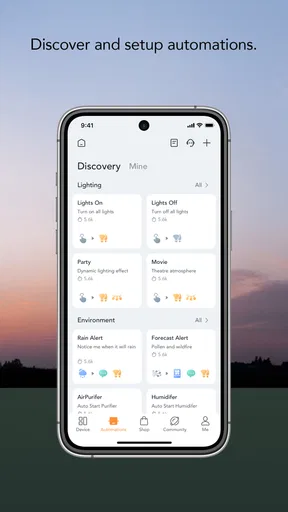
Yes, one of the app’s main advantages is the ability to automate compatible devices. Depending on the product, you can set timers, recurring schedules, scenes, and conditional routines, such as turning lights on at a certain time or switching devices off when you leave. Automation options are not identical for every device, however. Some routines may depend on location, sensors, cloud services, or additional integrations.
Is AiDot free to download, and are there any privacy concerns?
AiDot can generally be downloaded without an upfront app charge, but the connected devices themselves must be purchased separately. Certain products, services, or advanced features may have their own costs, and availability can differ by manufacturer or region. Because the app manages connected hardware and may process account, device, network, or usage information, review its current privacy policy and requested permissions before completing setup.


